Posts

Showing posts with the label symantec

Sunbelt VIPRE Enterprise and MY story

Image
This post was prompted by a couple of off-line inquiries into my experience with a recent VIPRE Enterprise deployment. I should point out that this is NOT my first deployment of anti-virus software . I've rolled out McAfee , Trend, and Symantec server/client solutions. I was probably found because of my activity on Twitter , since I was whining about it one day... In any case, here's my story. My client, a 3 shift manufacturing bakery with 90 clients and 5 servers, was looking to me and another consultant for suggestions for a replacement to Trend CSM, since it was expiring. It was suggested that we try VIPRE. I hadn't used it, did a bit of research, and eventually agreed to that it would be a good fit. It was easy to roll out, and even easier to manage. One issue I immediately called SunBelt about was the Admin UI, and it's inability to list the known vulnerability list without bogging down, and eventually bringing the server to it's knees. NOT a good th...

Symantec Endpoint Rapid Release for FU Worm

Image
NOTE: After a cursory view of the Symantec forums, it's come to my attention that it is NOT best practice to use Rapid Release, unless directed by Symantec or if you have this worm. I would compare this closely to M$ release of patches that are special in nature, and would normally only release these if the system exhibited specific symptoms related to said patch. In other words, use at your own risk. Image via CrunchBase Downloading and Installing RapidRelease Definitions: Open your Web browser . If you are using a dial-up connection, connect to any Web site, such as: http://securityresponse.symantec.com/ Copy and paste the address ftp://ftp.symantec.com/public/english_us_canada/antivirus_definitions/norton_antivirus/rapidrelease/sequence/ into the address bar of your Web browser and then press Enter.(this could take a minute or so if you have a slow connection) Now select 92114 folder or a higher. Open the folder. Select the file symrapidreleasedefsx86.exe When a down...

Symantec Endpoint Protection and Outlook's 0x800CCC0F Error

After upgrading from SEP 11 MR2 to MR3, my users 0x800CCC0F Outlook error stopped....for one day, then re-appeared. This issue ONLY occurred during his mail retrieval process. During my troubleshooting, I had initially opened a command prompt, and issued the command: telnet pop.myserver.com 110 And received an inline PGP reply, that it was proxying the connection. That prompted me to do a little Googling, but revealed nothing. I found a MS Kb article that pointed to some troubleshooting steps, but they didn't help at all, and neither did Symantec's kb or forums Much to my surprise and glee, he started to experiment with his POP settings. After setting his POP connection to SSL, his problems went away!

Symantec Endpoint Protection MR2 to MR3 Upgrade

Not much to mention...it_just_works. THIS TIME. Steps for upgrading: Download MR3 Stop all SEPM services. Run installer over the top of previous installation. Interestingly, researching an Outlook error 0x800CCC0F while POP'ing email down from our mail host, I found this article about how much better MR3 will perform, even over the likes of v10. Hopefully my test client will not experience any issues, as the SEPM surely didn't.

Redeploy Symantec Endpoint Security Client

I need a method to reinstall a SEP client package. Unfortunately, SEPM doesn't have a method in their GUI to do this...*nudgenudgewinkwink*, you must use the Migration and Deployment Wizard, and choose the default option Deploy the Client , and then Select and Existing Package to Deploy . I found a clue in a thread at Symantec's forums where one can use the %PROGRAMFILES%\Symantec\Symantec Endpoint Protection Manager\tomcat\bin\ClientRemote.exe utility, which is usually only revealed when you use the wizard, or initially install the product. You'll find your repository of packages you created in said installation at %PROGRAMFILES%\Symantec\Symantec Endpoint Protection Manager\Inetpub\ClientPackages, one folder for each package represented in SEPM, with a sub-folder called full. Unfortunately the folder names are named using the package checksum number, and I can't immediately tell by looking at the GUI which one is which. Fortunately for me, I only created two packa...

Symantec Endpoint Protection...again

Wow. I've really had LOTS of hits generated on this blog, since I posted some info about SEPM and my related issues, so I've decided to share some tips and other interesting findings. My guess is that many of you that hit my blog don't have the luxury of having a DEV environment to test in, so PLEASE do yourself a favor, and if you do nothing else, follow #7 and #8. This will prevent you from having to invest in the Hair Club for Men after you yank all yours out. Tips: SEPM doesn't like to be installed on custom HTTP ports, but it is possible. See 'Configuring the Symantec Endpoint Protection Manager to run with a custom HTTP port' Document ID: 2007111212591048 here . It's a pretty simple process. SEPM will not show graphics from RDP sessions....seriously. So don't put yourself in a situation as I did, and hang on the helpline-from-hell with someone that didn't know, nor did the knowledge-base. DOH! If you have to upgrade SEPM, God help you. I used...

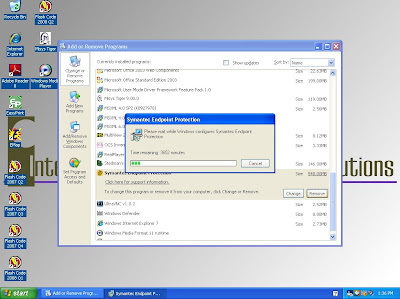
2.5 Days to uninstall Symantec Endpoint Protection client

Image
So today I'm trying to clean up a Symantec Endpoint Protection client install that went bad, and here's what I get during the uninstall process... Is it really gonna take this long? Can I make a pot of coffee stretch that far? Will my kids start college before this completes? In truth, this quickly went to 11 M$ minutes, then to 1 M$ minute. First time I've EVER seen anything like that before.

Symantec Endpoint Protection...blech

My SEPM server decided to do the BSOD the other night, at about 2:00am. Nice. Right when a few users from India were working on the server, which also happens to be our Terminal Server. Thankfully, I didn't get a call. I can't wait until MR2 comes out. Some of the touted improvements is a lighter weight processor footprint, fixed graphics (mine ALWAYS work at the console, just not remotely...), and I'm sure numerous other fixes. I hope I don't have to run around the office yet AGAIN to use their sylink tool reconnect my clients. I had originally scripted it, but it doesn't work if you impose password protection on the UI...hmph... I'd also found that logging on some of the clients was out of control. Saw many posts on Symantec's user forums to this affect, and my uninstalling and reinstalling seemed to fix that, for now.

Symantec Endpoint Protection...is a PIG

I just spent the last few days troubleshooting a Symantec Endpoint Protection migration from Symantec Antivirus Corporate Edition v10.x. What an effort. Much like the last time I upgraded a client from 9 to 10. They conviently forgot to include "May bring your older, underpowered workstations to their KNEES." in the product description. That client had about 25 workstations that were old HP workstations, runnning Windows 2000 on 256kb RAM and 500mHz CPU's. Once they started up, the "Startup Scan" would bring the machine to a crawl, and only perform well when it completed, which for those old things was quite a while. Nice of them to release a registry hack to disable that...then they release a config option in the next patch...NICE. Also forced the client to bump all the workstations RAM to 512. Nice for my billable hours, but not for their non-profit wallet. This time the environment is much different, and I "own" it. That is to say, I'm back to...