Posts

Showing posts with the label sql

OpenAir ETL Project

Image
Image via CrunchBase Reporting in OpenAir has presented our company with some challenges. As such, I was asked to take a look at how we might be able to create an ETL of this data , create our reports and automatically distribute them to our project managers. This is how I did it. First we needed to purchase OpenAir's Automated Backup service. This service will export data in text format or MySQL dumps of any or all tables in their database, zip them up and deposit them anywhere via FTP, FTPS , or SFTP . We set up an FTP server for our repository in the DMZ. Once this bit was done, I needed an installation of MySQL Server and a method to programmatically pull the data from the DMZ, deposit it on a Windows share, unzip and insert the data. Below is a batch file used for this purpose. @ECHO On SETLOCAL ENABLEDELAYEDEXPANSION @SET _LOGFILE="C:\Export\LOGS\OpenAirMysqlImports.txt" @SET _MYSQL="C:\Program Files\MySQL\MySQL Server 5.5\bin\mysql.exe...
AllScripts Tiger to MS SQL to GoDaddy Hosting

Image
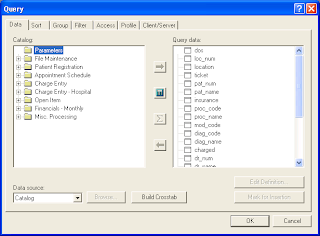
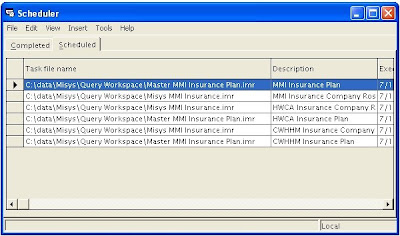
Some time ago, I wrote an article about using Cognos Impromptu to export data to CSV from a then Misys, now AllScripts Tiger data source, and use DTS in MS Sql Enterprise Manager to import it for displaying data in ASP pages. I started using this method to export other types of data, in an attempt to create a dashboard for our clients. I quickly found that Impromptu is not well suited or reliable enough for scheduling multiple jobs. The requirements and caveats for using Impromptu in this manner are: Each report must be scheduled so as to not be running when the next is scheduled. Impromptu will not allow the next scheduled report to wait too long, and this may cause the "chain" of reports to fail. The workstation running the reports must have a user logged in with the Cognos Scheduler application running in order to fire the reports off. It cannot run via the Windows Scheduled Tasks (AT for us old-timers). If you run your reports against multiple companies, as we do...

Importing CSV to MS SQL -or- Did I Do This Right?

Image
I was trying to find a quick and dirty method of exporting, and subsequently importing CSV data into MS SQL; programmatically. I'm dealing with rather small amounts of data, so this method may not work for many, but it Works For Me (tm). My source data comes from an AIX / uSQL box running Misys Tiger. Yes, I realize I could query that database directly, if I purchased the Transoft ODBC drivers for Server 2003, but at a couple grand it's much more cost effective to do it this way. The easiest method to retrieve my data is to use Misys Query, create a scheduled job, and export the resulting data to a network location for DTS (Data Transformation Services) to pick it up. The data is a rather exhaustive list of Insurance Companies, and their related plans. As one could imagine, this data is ever changing, a result of new "product lines" being developed by the lumbering health engine we call commercial payors. In the past, we exported the reports to PDF, and used the buil...